
Feeds
Kolahal has a small feed reader built in. No scripting needed.
Subscribe
Section titled “Subscribe”feed add https://hnrss.org/frontpagefeed add lwn.net/headlines/rss # https:// is assumed; feed:// links work tooAdding a feed fetches it right away. The address is normalised, so adding the same feed twice
returns the existing subscription. feed:// links open as https://. A feed on your own network
(a home server) works (new on Android 17 and newer, once you allow it with
local-network); a public feed can’t redirect into your network. The newest 300 items of a feed
are read.
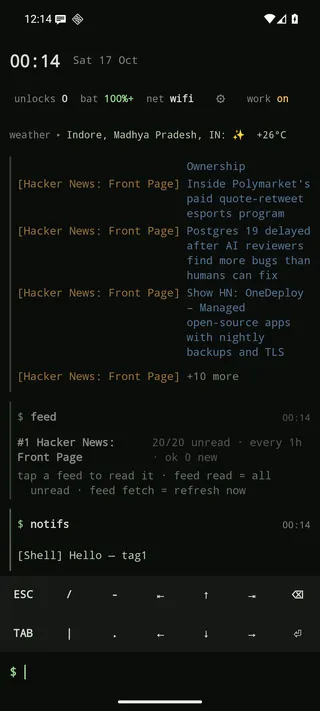
feed # list: #id, title, unread/total, interval, notify, last status (also: feed ls)feed read # all unread items, then mark them readfeed read 2 # unread items of feed #2feed all 2 # every stored item of feed #2, read or notfeed open 2 # open up to 10 unread items of #2 in the browser, mark them readfeed fetch # refresh every feed now (feed fetch 2 for one)Item lines are tappable links; long-press to share or copy. When a fetch finds new items they
appear in the log under a ── Feeds · 10:30 ── header, at most feeds.log-lines (default 10) per
feed, with a “+N more” line (tapping it puts feed read <id> in the prompt).
Read and unread
Section titled “Read and unread”Every item starts unread when it is first fetched. It becomes read when you:
- open it: tap its line in the log, use “Open link” from the long-press menu, or tap it on the Feeds screen;
- list it with
feed read. Only the items that were printed count; anything beyond the 40 shown stays unread; - open it with
feed open; - use “Mark all read” on the Feeds screen.
Seeing a line scroll by in the log does not mark it read, unless you turn on
feeds.read-shown. feed all lists items without changing them. The unread count is simply the
number of stored items still unread (up to 300 per feed are kept, unread ones first).
When you subscribe, everything the feed already contains is unread too. A busy feed can start at
20 or more unread items. Turn on feeds.backlog-read to count those as read, so only posts that
appear after you subscribed are unread.
Feeds screen
Section titled “Feeds screen”new feeds opens a GUI screen for managing subscriptions: adding, removing and toggling feeds, intervals
and notifications, without typing ids. Tap a feed for its items (tap one to open it and mark it read).
The top bar refreshes everything and imports or exports OPML, so you can move subscriptions from
or to another feed reader. The feed … subcommands keep working as before.
Feed behaviour is under Settings → Feeds: whether new items go to the log and how many, the
read / unread options above, refreshing on Wi-Fi only (feeds.wifi), and the interval and
notification setting new subscriptions start with (feeds.interval, feeds.notify). The page also
leads to the Feeds screen.
Per-feed settings
Section titled “Per-feed settings”feed every 2 2h # check feed #2 every 2 hours (minimum 15m; default 1h)feed notify 2 on # one notification per fetch with new items (off to stop)feed off 2 # pause a feed; feed on 2 resumes itfeed rm 2 # unsubscribe and delete its itemsHow fetching works
Section titled “How fetching works”- One background job fetches the feeds that are due by their own interval. new It
wakes only as often as your most frequent feed needs (every 15 minutes at most), and only when there
is a network, or only on Wi-Fi with
feeds.wifi on. - Requests are conditional (ETag / Last-Modified), so an unchanged feed costs a
304and no parsing. - Up to 300 items are kept per feed (unread first, then newest).
- A failed scheduled fetch is only recorded in the feed’s status (shown by
feed). A fetch you asked for (feed fetch) also logs the error. - Feeds run in the launcher process, not the script sandbox. For a feed you only want to see once,
rss <url>prints up to 15 items into the log without subscribing.
Feeds or a script?
Section titled “Feeds or a script?”Built-in feeds are the easy path. For filtering, merging several feeds into one line, scoring
or a header status line, write a script with
rss.fresh(url), like the bundled
hn and feeds scripts.