
Apps
Launching
Section titled “Launching”Type part of an app name and press Enter. The basics
page explains exactly which app Enter picks. open <app> (alias launch) does the same
explicitly and takes profile flags:
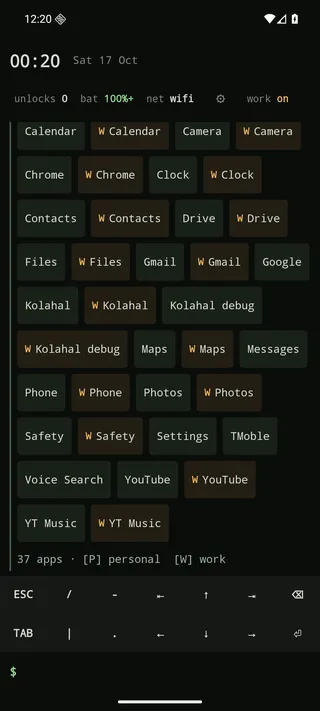
open mapsopen gmail -wListing
Section titled “Listing”apps # grid of chips (alias: ls)apps -l # one per lineapps work # one profile: work, personal, privateapps hidden # only hidden appsapps -a # include hidden appsTap a chip to launch it; long-press for launch, shortcuts, the other-profile copy, app info, copy package name, hide and uninstall.
Favourites
Section titled “Favourites”new Pinned apps lead the suggestion strip whenever the prompt is empty, in the order you pinned them, followed by your most-used apps.
pin maps # or long-press an app → Pin to favouritespins # grid of pinned appsunpin mapsPins are part of the backup file.
Hide and rename
Section titled “Hide and rename”hide calculator # gone from lists, search and suggestionsapps hidden # see what's hiddenunhide calculatorrename youtube = yt # custom labelrename yt = # empty restores the original labelrename chrome -w = work web # flags pick the profileHidden apps and custom labels are part of the backup file.
App shortcuts
Section titled “App shortcuts”Launcher shortcuts (the menu you get by long-pressing an icon in other launchers) work too. They need Kolahal as the default launcher.
shortcuts maps # list them; tap one to start itopen maps:home # start the shortcut whose label best matches "home"They also appear in every app’s long-press sheet.
Aliases
Section titled “Aliases”alias m = open maps # definealias # listalias m # show oneunalias m # removeAliases expand the first word (up to five levels, without cycles). A built-in command name can’t be an alias.
App info and uninstall
Section titled “App info and uninstall”info whatsappuninstall some-game -wInstall, update and uninstall log
Section titled “Install, update and uninstall log”Installs, updates and uninstalls show up in the log: the app name, then its package name and its version
on dimmed lines below, with a profile tag and + / ↻ / − at the end of the first line
(Updated Maps [W] ↻). An update is always one line, and so is an uninstall followed by
a reinstall within 20 seconds. Because of that window, an uninstall line appears about 20 seconds
after the app is gone, or as soon as you come back to the home screen after that. Changes made while
the launcher wasn’t running are caught up when it starts. installs [<n>] lists the recent history
with dates.
Screen time and unlocks
Section titled “Screen time and unlocks”usage # time per app today (alias: screentime)usage 7 # last 7 days (1–30)unlocks # today's unlock countunlocks 7 # bar chart for the last week (1–30)usage needs Usage Access (usage-access). Unlock counts use Usage Access when granted and
fall back to counting ACTION_USER_PRESENT broadcasts while the launcher is running.